
The 2011-issued Secure Boot certificates for Windows devices have officially expired in June 2026. Microsoft is actively rolling out new certificates via Windows Updates. While the new certificates have been successfully installed on the vast majority of eligible devices, some users are still facing issues and are left with the expired Secure Boot Certificates. This article helps you understand the “Secure Boot is on, but your device does not support the automated Secure Boot certificate update” message in Windows Security, why it appears, and what steps you can take to address it.
Secure Boot is on, but your device does not support the automated Secure Boot certificate update
The Windows Security app is the easiest way to check the status of the Secure Boot Certificate update. Many users are encountering the “Secure Boot is on, but your device does not support the automated Secure Boot certificate update due to hardware or firmware limitations” message in Windows Security, which prevents their devices from receiving the new Secure Boot Certificates through Windows Update.
Previously, little information was available in the official documentation about this error, leaving affected users unsure of their next steps. Microsoft has now published an updated support article. The revised documentation details the exact root cause of this error and outlines the necessary steps users can take to address this issue.
Secure Boot Certificate update is failing on Windows computers
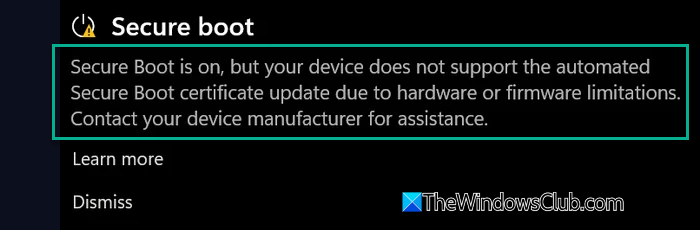
The latest documentation states the following meaning of this error:
Your PC model might no longer be supported by the OEM, or the OEM might no longer be able to provide the firmware updates needed to update your device’s Secure Boot trust configuration. Check your OEM’s Secure Boot support page to confirm whether your device is out of support or whether a firmware update is available.
This indicates that your PC model has either reached its end-of-support life cycle with the OEM or that the manufacturer is no longer able to deliver the firmware updates required to modify the device’s Secure Boot trust configuration. In this case, you need to contact your computer manufacturer’s support.
Another updated message that Windows Security may show is:
Devices in this group are affected by a known issue. To reduce risk, Secure Boot certificate updates are temporarily paused while Microsoft and partners work toward a supported resolution. Contact your device manufacturer for assistance.
This means that the Secure Boot Certificate updates are temporarily paused on your device due to a known bug. The installation of the new certificates will be resumed automatically once Microsoft releases a fix or the OEM delivers a compatible BIOS update.
You could update your BIOS/UEFI and use the Reset or Restore Factory Keys option in your Firmware settings, and see if that helps.
For more details, you can read the updated support article published on Microsoft’s official website.

Leave a Reply