
Microsoft officially released Windows 11 26H2 for all users. Windows 11 26H2 brings many new features, along with security improvements and performance enhancements. While Microsoft delivers Windows 11 26H2 to all eligible devices through Windows Update, some features remain dormant until you install the 26H2 Enablement package. This article highlights the new key features and changes introduced with Windows 11 26H2.
Windows 11 26H2 introduces new features
Windows 11 26H2 is available through Windows Update. If your device is eligible, you can install it directly from the Windows Update page in Settings.
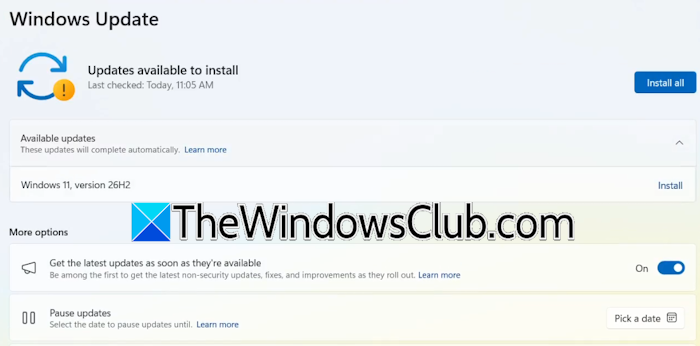
- Launch Windows 11 Settings.
- Go to Windows Update.
- If your device has already downloaded the update, you will see it there. Click Install; otherwise, click Check for Updates.
Some of the features of Windows 11 26H2 are already present on devices running Windows 11 version 25H2 or 24H2, but they remain disabled until you install the 26H2 enablement package. The enablement package has the KB number KB5121794. Microsoft confirms that the Enablement Package can be installed only through Windows Update and is not available in the Microsoft Update Catalog.
What’s new in Windows 11 26H2?
Windows 11 26H2 introduces several security improvements, including administrator protection for just-in-time admin privileges and profile separation, and built-in Sysmon functionality to capture system events for threat detection. You can now enable or disable Smart App Control without performing a clean installation of Windows. Windows Hello will now support peripheral fingerprint sensors. Moreover, the new driver security enhancements will change how the Windows Kernel trusts third-party drivers.
Windows 11, version 26H2 also introduces improvements designed to help IT administrators to deploy, manage, and secure devices at scale. Windows settings backup and restore support extends to hybrid-joined devices, cloud PCs, and multi-user environments. You can use it to restore user settings and Microsoft Store apps during device refreshes, upgrades, and migrations. A new point-in-time restore option allows users to roll back their PCs, including apps, settings, and personal files.
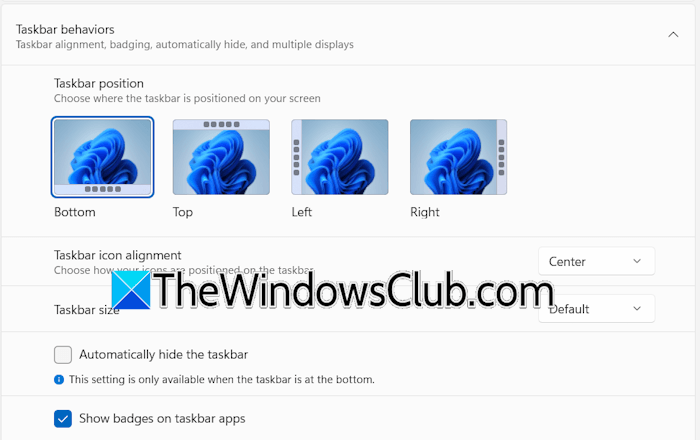
Windows 11 26H2 also brings several user experience and accessibility improvements. Now, users can change the Taskbar size and position. This is the most awaited feature in Windows 11. AI-powered actions are added to File Explorer to work with supported images and summarize OneDrive and SharePoint documents. Windows Search offers better previews, typo handling, and indexing. Magnifier now has more precise zoom controls and screen tint options to improve readability. The Task Manager now provides greater NPU usage visibility, including NPU utilization and memory information.
Microsoft also disclosed the servicing and support lifecycle for Windows 11 26H2. The support duration for Windows 11, version 26H2 for Home and Pro editions will be 24 months, while 36 months for Enterprise and Education editions.

Leave a Reply