
Microsoft is adding new tools and features to Edge for web developers. According to Microsoft, these new tools and features will help web developers build better web experiences, improve website performance, and prepare websites for AI agents. This article covers the key highlights of this update.
Microsoft Edge gets new tools and features for web developers
Microsoft announced several updates for the Edge browser and developer tools. These updates include performance improvements, accessibility enhancements, DevTools updates, and WebMCP. WebMCP is designed to create efficient, fast, and trusted human-agent collaboration workflows for a website. Here we will discuss some of the key changes for Edge included in this latest update.
Web components’ accessibility enhancements
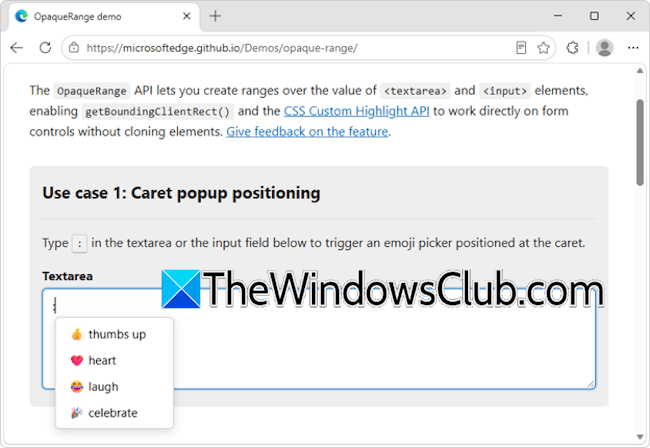
The new update will add new features to Edge that will help developers make web components more capable and accessible. The new OpaqueRange API will provide live access to ranges of text within form inputs, such as <textarea> and <input> elements. Developers can use these ranges for operations like getBoundingClientRect() and getClientRects(). The OpaqueRange API will also work with the CSS Custom Highlight API, making it possible to create personalized highlights within editable text regions.
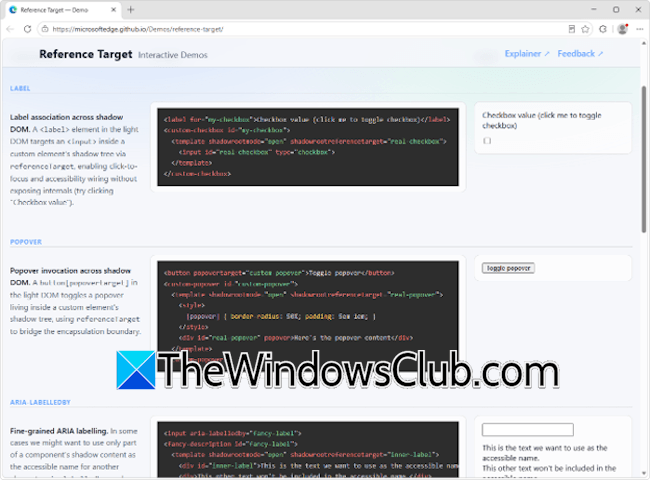
Developers often struggle to make web components with Shadow DOM accessible. This issue is often called cross-root ARIA. With this update, developers can use the referenceTarget property to address this issue. Microsoft is also adding the new HTML aria-actions attribute to make it possible to expose widgets’ secondary actions to screen readers.
WebMCP
Microsoft is also working with Web Machine Learning Community Group on WebMCP, a web API that helps developers create efficient, fast, and trusted human-agent collaboration workflows for websites. WebMCP will allow AI agents to interact with websites alongside humans. WebMCP will let developers reuse existing front-end code and expose it as structured tools. A browsing agent can use these structured tools to help users accomplish tasks on a website.
Network debugging tools
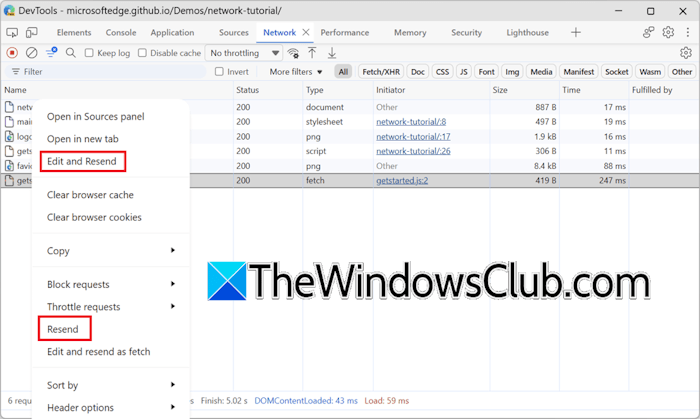
Microsoft has also added new network debugging tools, Resend and Edit and Resend requests, to Edge. These new networking tools are available in Edge version 153 and later. While the Resend action resends a request, the Edit and Resend action creates a Fetch API but does not send it right away. Instead, it writes it to the input of the Console tool. Developers can then modify the new request, such as by changing the request headers or parameters, and send it.
Other features
Other features added to the new Microsoft Edge are:
- Media pseudo-classes allow developers to style media elements, such as <video> and <audio>, based on their playback state.
- The alpha() CSS function helps developers create a new color by adjusting another color’s transparency.
- textStream() is now available on Response, Request, and Body objects.
- The <camera> and <microphone> HTML elements are browser-provided buttons that let users toggle camera or microphone streams.
That’s it, these are some of the key highlights of this update. You can get complete information in Microsoft’s official blog post.
