
Microsoft announced a major update to all Windows 11 PCs, transforming them into AI-powered assistants. Copilot will be the center of this transformation and deeply integrated into the Windows 11 operating system. This move by Microsoft will show a significant shift in users’ behavior when interacting with their Windows 11 PCs.
Microsoft is transforming every Windows 11 PC into an AI PC
With this update, Microsoft aims to make AI the core part of everyday computing. Windows 11 users will now be able to operate their PCs using voice commands as well.
Operate your PCs with voice commands
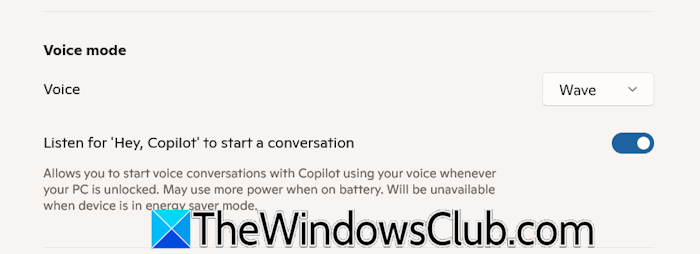
This new update will make your PC understand you. Now, users can start a conversation with Copilot anytime, provided the respective setting is enabled in Copilot. To get started, users have to turn on the “Hey Copilot” option in Copilot settings. To end the conversation, say Goodbye or click X.
Copilot Vision is now available worldwide
Microsoft is also making Copilot Vision on Windows available in all markets where Copilot is offered. Here are some of the key features it includes:
- Full desktop and app sharing: Copilot can help analyze content, provide insights, and answer your questions.
- Highlights: With Copilot Highlights, you can ask Copilot, “show me how” for a specific task, and it will guide you within the app.
- Full app context in Word, Excel, and PowerPoint: With this new update, Copilot Vision can access and review the entire content of the shared document, not just the portion displayed on your screen.
- Text in Text out: Microsoft will soon launch the text input feature to Copilot Vision. First, it will be launched to Windows Insiders.
The AI-powered Taskbar
Microsoft will add a new Ask Copilot Anything feature to the Windows 11 Taskbar, making Copilot a natural part of how you use your PC. This update will convert the Taskbar into a dynamic productivity hub, offering one-click access to Copilot Vision and Voice. This redesigned search experience will deliver lightning-fast search results, making it easier for users to find apps, files, and settings instantly.
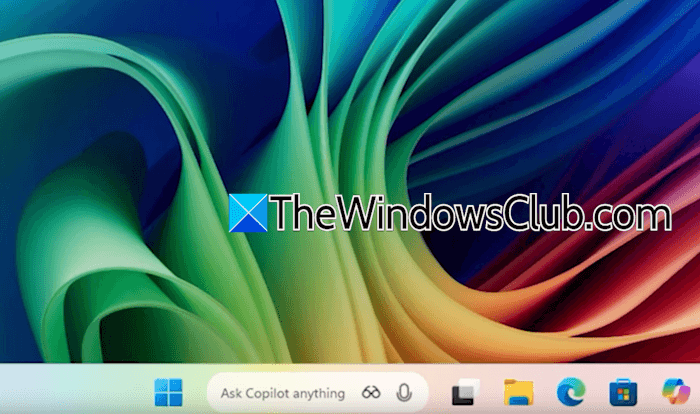
This system will use existing Windows APIs to provide results without giving Copilot access to your personal content, ensuring both speed and privacy in the new Windows experience.
Other important highlights
- Copilot Connectors will be available to Windows Insiders, allowing them to link their favorite services, like OneDrive files, Outlook contacts, Calendar events, Google services, etc., directly to the Copilot on Windows app.
- Manus AI will be integrated into File Explorer, enabling users to create websites using the documents in their local folders with a single click.
- Microsoft and Xbox have teamed up with ASUS to bring Gaming Copilot to the ROG Xbox Ally and Ally X handheld devices. Soon, players will be able to use Copilot for in-game help and recommendations.
This new update will make Windows 11 more user-friendly to all users. You can read complete details on the official Windows Blog.
