
Microsoft has introduced a new way to install or update apps on your Windows computer. Often, updating or downloading apps from the Microsoft Store can cause a crash. Now, in such a case, users can use the Microsoft Store Command-Line Interface (CLI) to do the same. As a result, you can now use the terminal to manage your applications.
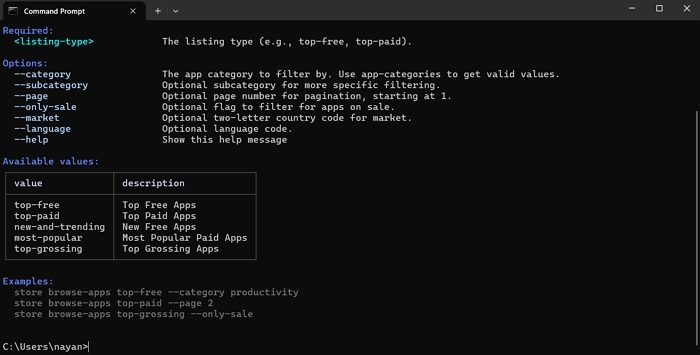
Microsoft Store Command-Line Interface (CLI)
With the new Microsoft Store Command-Line Interface (CLI) tool, you can bypass the Microsoft Store entirely. Instead, you can use simple text commands inside the terminal to access it via commands like:
store browse-apps– Search and filter the Store catalog by category, subcategory, listing type, market, language and more.store install <product-id>– Deploy apps directly from the command line with a single command.store update<product-id>– Install the latest version of any app without navigating through menus.store --help– Get more help.
You can now discover and manage software directly from the Terminal. Just open Command Prompt or Terminal to go ahead.
Additionally, for developers, Microsoft has outlined several critical upgrades to the Partner Center to improve app health and transparency. One of the key features is “Anomaly Alerts”. By leveraging advanced data patterns, the Store can now automatically notify developers of unusual spikes in crash or hang rates via email. This proactive approach is paired with a redesigned Health Report that supports multi-filter analysis across device architectures and OS builds, enabling faster troubleshooting and technical refinements.
A new Summary Dashboard has been launched to provide a consolidated view of key performance indicators (KPIs), including installs, ratings, and stability metrics. Additionally, developers are receiving an updated Usage Dashboard that tracks active devices and session durations. Developers will have a clear view of how users interact with their apps over time.
Furthermore, Microsoft is also offering a new web installer that supports an “Auto-Open” capability for Win32 apps, allowing software to launch immediately after installation without further user input.
Overall, with these new updates, Microsoft is positioning its Store as a more versatile hub. These updates demonstrate a commitment to listening to the community, ensuring the Windows 11 app ecosystem remains a competitive and developer-friendly pillar of the OS.
