
Microsoft announced the availability of the Pull Print feature in Universal Print Anywhere. This update will bring enhanced security and flexibility to enterprises. This Pull Print feature will allow users to send print jobs from any location and device and print them only when they are physically present at the selected printer.
Microsoft rolls out Pull Print for Universal Print Anywhere
The availability of Pull Print in Universal Print Anywhere will provide users with greater flexibility and privacy, allowing them to release print jobs only when they are physically present at the selected printer. This will reduce the risk of leaking sensitive and confidential information when printers are left unattended.
What is Pull Printing?
Pull Print is a new secure feature that allows users to send a print job from any device and location without selecting the destination printer. These jobs are held in a secure queue until the user authenticates the member printer of his/her choice. This ensures the sensitive and confidential documents are not left unattended, minimizing the risk of unauthorized access.
Benefits of Pull Printing for Organizations
The introduction of Pull Printing in Universal Print Anywhere provides organizations with the following advantages:
- Enhanced security and privacy: Universal Print Anywhere allows users to print documents from anywhere. However, printing documents through the cloud has a risk of official documents being accessed by an unauthorized person. The Pull Print feature in Universal Print Anywhere avoids the risk of official documents being leaked. Users will only be able to print the documents after authenticating themselves.
- Improved flexibility: The Pull Printing feature allows users to retrieve print jobs from any member printer within the organization, eliminating the need to select a particular printing machine.
- Reduced waste and cost: Unattended printed documents lead to unnecessary waste of paper and money. The Pull Printing feature helps organizations cut costs by saving paper and ink.
- Cross platform support: The Universal Print Anywhere works seamlessly on Windows and macOS devices, ensuring all employees take advantage of the Pull Print functionality regardless of their device preference.
How the Pull Print in Universal Print Anywhere works
The Pull Print in Universal Print Anywhere works in the following three steps:
- Printer registration
- Secure release configuration
- User authentication
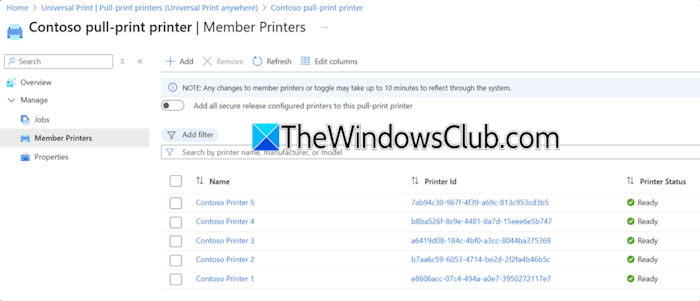
First, administrators have to register their printers to Universal Print either directly or through the Universal Print Connector. After that, administrators have to configure the secure release option for each of the member printers.
After giving the print jobs, users have to authenticate at any member printer to retrieve the print jobs.
The Universal Print Anywhere is now available to Microsoft 365 worldwide. Microsoft provides this feature to your existing Universal Print licensing at no additional cost. For more details, you can visit the official blog page of Microsoft.
